A team shipping a revenue-critical Flutter app had no automated tests. Regression was done by hand, which meant only the headline features got checked, the check cost days, and the sign-off was somebody saying it looked fine. I built the practice that replaced that, and the method behind it.
01
What manual regression was costing
Time
A full pass took a QA day or more, and every retest spent it again.
Narrow coverage
Only the headline features were checked, because that is all a person can reach by hand.
Late detection
Defects surfaced right before a release, or after it.
No evidence
Sign-off was a verbal yes, with nothing to audit afterwards.
02
One run, start to verdict
One command
Kick it off and walk away
No babysitting and no terminal skills required. A picker chooses the areas, the user profile, the language and the tag filter, so QA runs it without touching a command line.
Unattended
It drives the real app on a device
Taps, types and scrolls a real build. Black box, no stubbing, hard timeouts so a hung step cannot hold the run open.
Every checkpoint
Evidence captured as it goes
A screenshot at each checkpoint and a recording of the whole run, so a failure arrives with the exact step and a picture of the device at that moment.
At the end
The report grades itself
A self-contained HTML file with a computed GO or NO-GO verdict, per-flow results, durations and video timestamps. Never hand-written.
Then again
A second program checks the first
An independent verifier reads the same evidence and recomputes every number, so the grade is not the opinion of the thing being graded.
90+
journeys automated, from about 10 by hand
~12 min
one full unattended run
2 languages
English and Arabic, RTL included
03
What one run replaces
The report computes this for itself on every run, against the manual baseline it was built to replace.
Manual baseline
157 UAT cases at about 5 minutes each, roughly 785 minutes, or 13 hours of skilled QA time. Headline features only, and no evidence at the end of it.
This run
12 minutes, unattended, with every scenario screenshot-backed.
Saved per run
About 773 minutes, close to 13 hours, every single time it runs.
And repeatable
At a cadence manual regression cannot reach, because nobody has to be there.
04
How it is put together
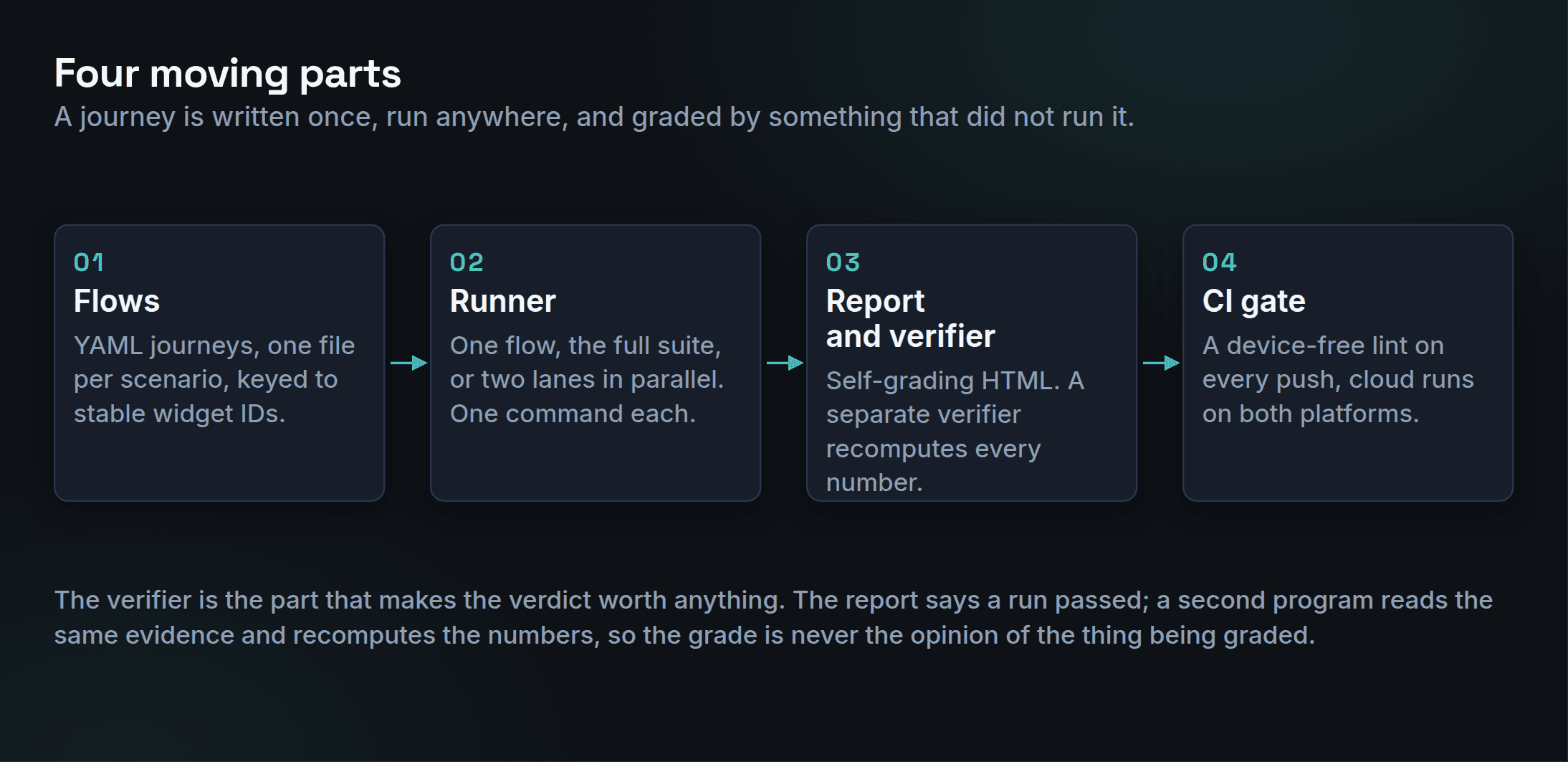
Everything specific to a project lives in one config file, so the engine is not tied to the app it was built against. Pointing it at a second Flutter app is a new config and that app's own flows. It has been split into its own repository and run unchanged.
05
The unlock was in the app, not the tool
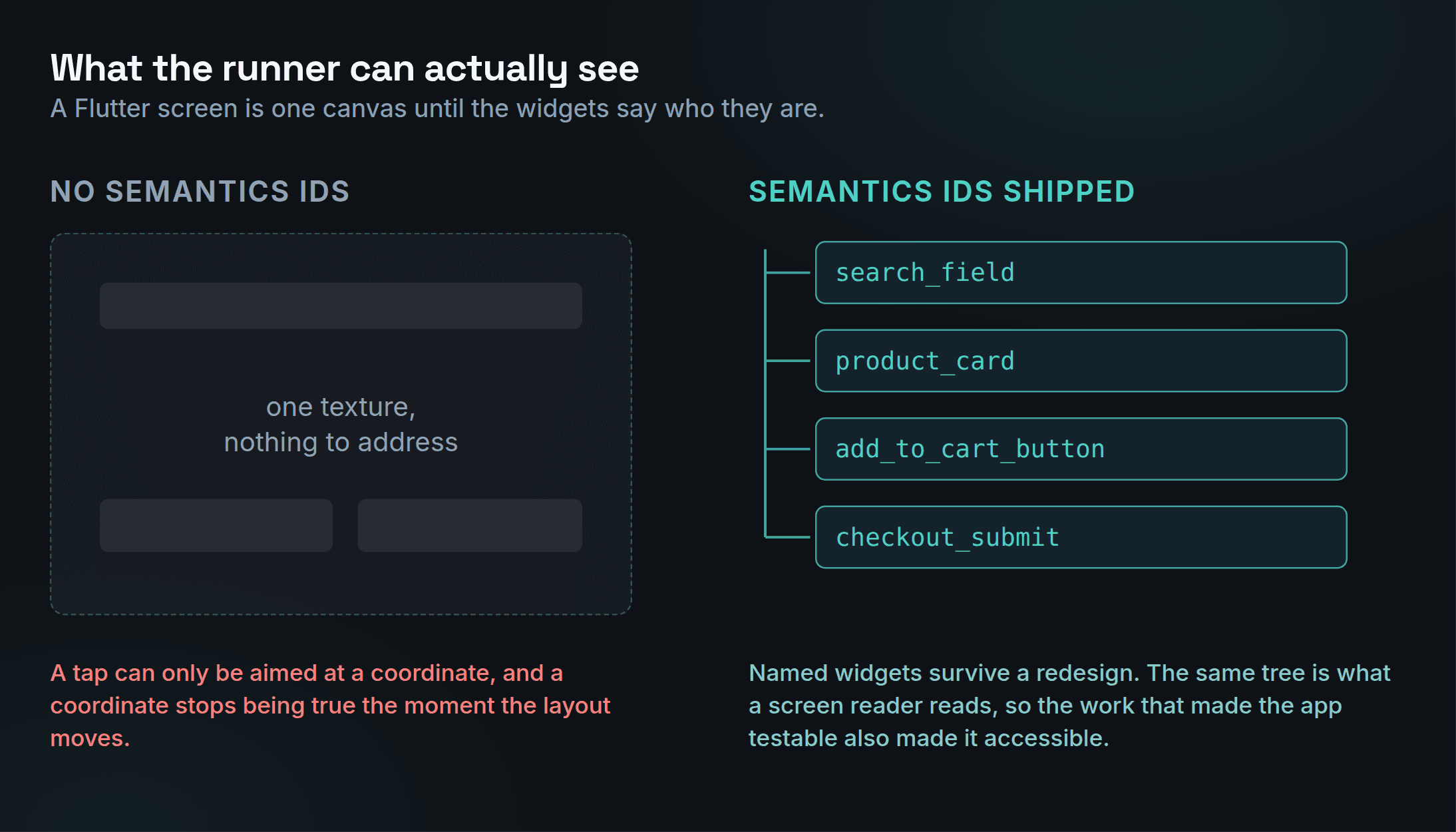
A Flutter app renders to a canvas. Without semantics, an automation tool has nothing to address and can only tap coordinates, which stop being true the first time the layout changes. One semantics ID per widget, shipped with the screen, is what makes the app testable at all. It is a one-line change in a pull request, and it is also an accessibility win, which is the argument that got it adopted.
06
Why Maestro and not Appium
| Dimension | Appium | Maestro |
|---|---|---|
| Sees Flutter widgets | Yes, once the app exposes semantics IDs. Before that, an opaque canvas. | Yes, through the same accessibility tree. |
| Flutter support | Black box through UiAutomator2 and XCUITest. The Flutter driver bridge is deprecated. | First class, with no driver to install. |
| Flakiness | Manual waits are typical, and there is a driver stack to keep working. | Auto-waits, one code path. |
The honest version of this table: the real unlock was the semantics IDs, and those would have helped Appium too. Maestro won on lighter setup, lower flakiness, and because the report and verifier were built around it.
07
Eight gates the report grades itself against
A verdict is only worth something if the thresholds were set before the run rather than after it. These are the thresholds, and every report computes itself against them.
| Gate | What it measures | Green | Amber | Red |
|---|---|---|---|---|
| P0 pass rate | Must-pass scenarios that passed this run | >= 95% | 90 to 94% | < 90% |
| P0 coverage | Share of must-pass scenarios actually automated | >= 80% | 70 to 79% | < 70% |
| Overall pass rate | Every flow that passed, across every area | >= 90% | 80 to 89% | < 80% |
| Flakiness | Flows that pass and fail inconsistently across runs | <= 5% | 6 to 10% | > 10% |
| Suite freshness | Days since the last fully green full run | <= 7 | 8 to 14 | > 14 |
| Last-run recency | Days since the suite ran at all | <= 3 | 4 to 7 | > 7 |
| Blocker age | Days the oldest open blocker has stayed open | <= 14 | 15 to 30 | > 30 |
| Stability streak | Consecutive runs with the same green result | >= 5 | 3 to 4 | < 3 |
08
Breaking it on purpose
A journey counts as covered only when its unhappy paths are automated too. One epic does nothing but misuse the app.
×
Rapid taps, double submits, and the race conditions they expose
×
A wrong one-time code, repeated: the screen must not advance
×
Backgrounding and relaunching mid-flow: state has to survive
×
Hostile text in fields: very long, emoji, right-to-left
×
No connection at all: fail gracefully, do not crash
This is the part that has already paid for itself. Driving the app the way a confused or impatient person would surfaced a reproducible crash on both platforms, found from the evidence trail, investigated against logs, and re-verified before it was reported.
09
Who owns it after me
A practice that only works while one person is present is not a practice. The roles are written down, and so is the method.
QA
Runs the picker, triages a failure into app bug, test bug or data, and writes flows for their own cases.
Developers
Ship one semantics ID with every new screen. Free in the pull request, and an accessibility win.
Maintainer
The engine, the reliability patterns, and the catalogue of failure modes.